

MP3 Software Decoder on Microcontroller | Source Code + Schematic Leave a comment

To achieve a suitable audio output, we must be able to decompress individual frames at the appropriate time, send them to the digital-to-analog unit for playback, and there should be no interruptions to prevent audio gaps or skips. Given the capabilities of old microcontrollers, this was not possible; because due to memory and processor limitations, the speed of converting frames to raw files was lower than the audio playback bitrate, and this very issue caused these types of microcontrollers to be unable to play such files. To address this deficiency, chip manufacturing companies took action and introduced their hardware decoders to the market. Most users resorted to these types of chips for playing audio files in MP3 format.

One of the well-known companies in the production of decoder chips is VLSI, which gained significant popularity through the VS1003 chip. Using this chip, many portable and non-portable players were designed.
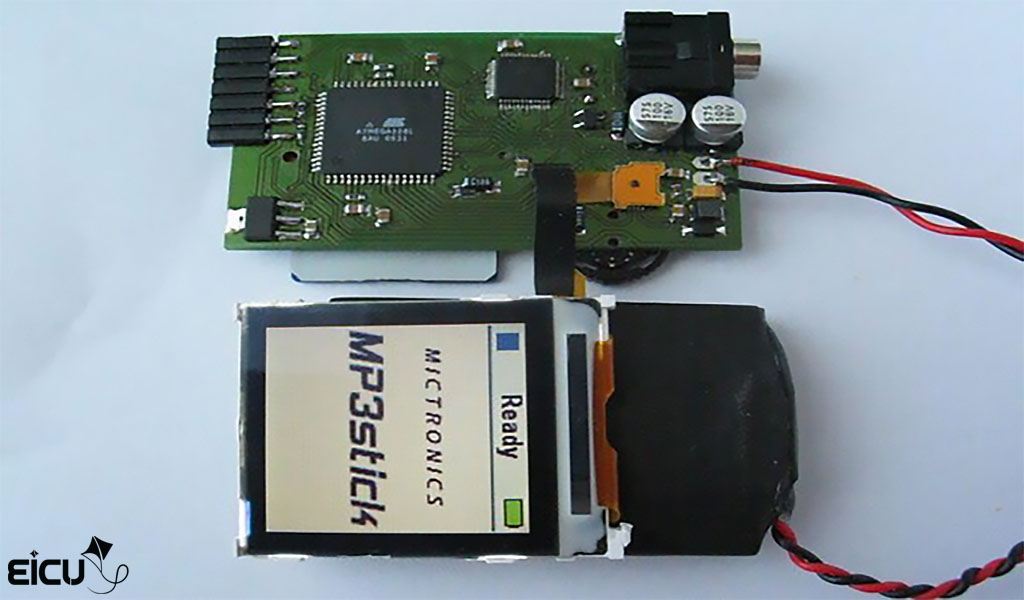
As an example, the photo below shows a portable MP3 player built using this very chip and an AVR microcontroller.
However, this type of design came with its own specific problems. Including the bulkiness of the circuit, higher energy consumption, increased final cost, and so on. But there was no other solution, and using these types of chips was inevitable.
Until ARM microcontrollers were introduced, which, in addition to low power consumption, had significantly higher processing speeds. The amount of memory and high processing speed of this family of microcontrollers made it possible to decode and directly play MP3 files; in such a way that no external components are needed for decoding and playback, and all processes can be handled within the microcontroller itself.
Extracting Frames
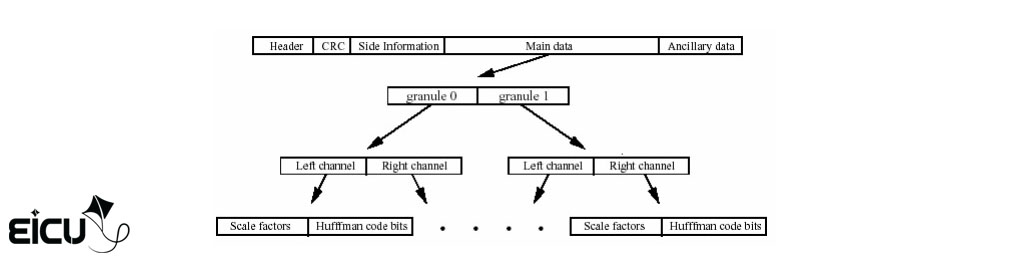
Up to this point, we have become familiar with the general structure of the MP3 file. To start the decoding and playback process, the first step is to find the frames and extract them from the file. As you know, an MP3 file consists of a collection of audio frames.
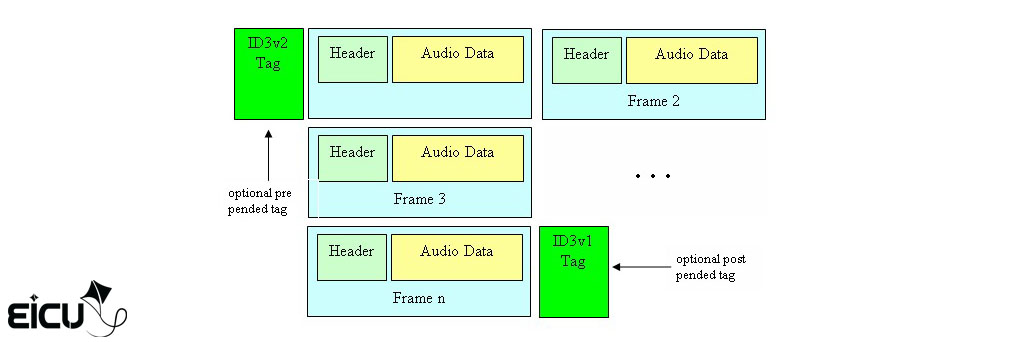
As you can see in the image above, each data frame has a header that, in addition to specifying the start of a frame, also contains a set of information about that frame. For clearer understanding, look at the table below:
Each frame contains the above details, where the first 32 bits (4 bytes) hold the sync and header information. The next 16 bits (2 bytes) contain validation information, which is optional, meaning it may not exist. The next 136/256 bits contain information related to the audio channel; (as you know, an audio file may be mono or stereo) and the remaining data pertains to the audio data.
To extract the audio data from its compressed and encoded state, it is necessary to first extract the frame information from the header and, based on the obtained data, begin decoding the audio data.
MP3 Decoding – MP3 Header Decryption
As we mentioned earlier, the header contains 32 bits, each bit having its own specific meaning and significance. If we categorize the bits separately and color them according to their meaning, the result will be as follows:
AAAAAAAAAAABBCCDEEEEFFGHIIJJKLMM
- 11 bits (A) (bits 21 to 31): Identification bits (all 1s) used to detect the start of a frame.
- 2 bits (B) (bits 20 and 19): Header version containing 4 states:
- 00 – MPEG Version 2.5
- 01 – reserved
- 10 – MPEG Version 2
- 11 – MPEG Version 1
- 2 bits (C) (bits 18 and 17): Layer descriptor:
- 00 – reserved
- 01 – Layer III
- 10 – Layer II
- 11 – Layer I
- 1 bit (D) (bit 16): Validation bit
- 0: CRC section will exist.
- 1: CRC section will not exist.
- 4 bits (E) (bits 12 to 15): Output bitrate (according to the table below)
All values are in kbps
- V1 – MPEG Version 1
- V2 – MPEG Version 2 and Version 2.5
- L1 – Layer I
- L2 – Layer II
- L3 – Layer III
- 2 bits (F) (bits 10 and 11): Sample rate according to the table below
- Bit (G) (bit 9): Padding bit
- 0 – frame is not padded
- 1 – frame is padded with one extra slot
- Bit (H) (bit 8): Private bit. This one is only informative.
- 2 bits (I) (bits 6 and 7): Channel Mode
- 00 – Stereo
- 01 – Joint stereo (Stereo)
- 10 – Dual channel (2 mono channels)
- 11 – Single channel (Mono)
- 2 bits (J) (bits 4 and 5): Mode extension (Only used in Joint stereo)
- Bit (K) (bit 3): Copyright
- Audio is not copyrighted
- Audio is copyrighted
- Bit (L) (bit 2): Original
- 0 – Copy of original media
- 1 – Original media
- 2 bits (M) (bits 0 and 1): Emphasis
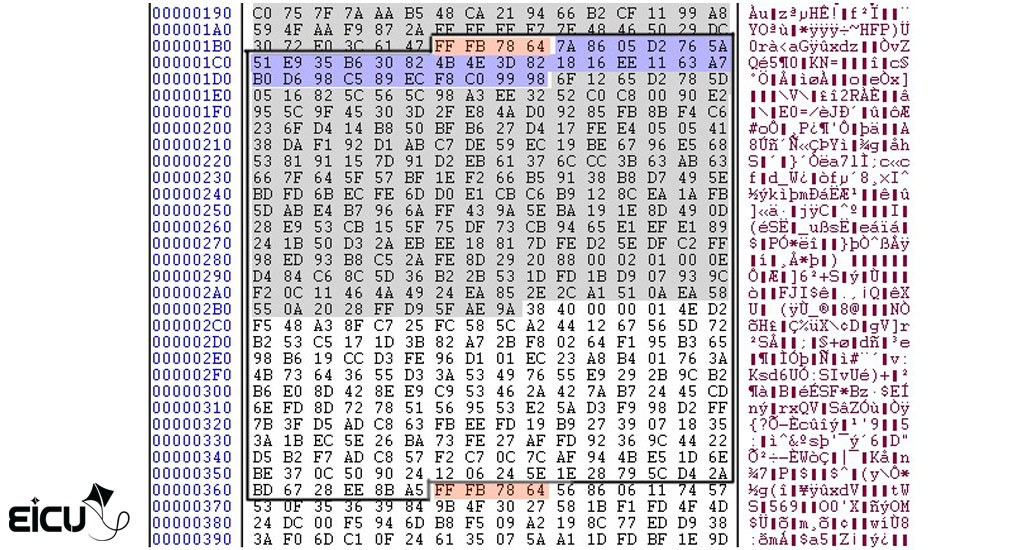
After the four bytes describing the header, depending on the status of bit D in this descriptor, there may or may not be 2 bytes of CRC. After these optional two bytes, depending on whether the frame is single channel or dual channel (bits 6 and 7), there will be 17 or 32 bytes of channel information, followed by the audio data. Note that in very rare cases, a frame may not contain audio data. In the image below, we have marked one frame within an MP3 file where the 4 red bytes are the header and the 32 blue bytes are the channel information. The remaining bytes are the audio data. Note that there are no error-checking bytes.
MP3 Decoding – Audio Data Decryption
To decrypt the data in this section, you first need to be familiar with the Huffman algorithm; the Huffman coding method is a data compression method founded by David Huffman. In the Huffman method, data is compressed by 20 to 90 percent. The Huffman algorithm uses a priority queue data structure. Explaining how the Huffman algorithm works is beyond the scope of this article, and those interested in learning can refer to relevant websites.
For decoding this section, as shown in the image, you must use the Huffman tree.
How to Build an MP3 Player Module
Hardware Explanation
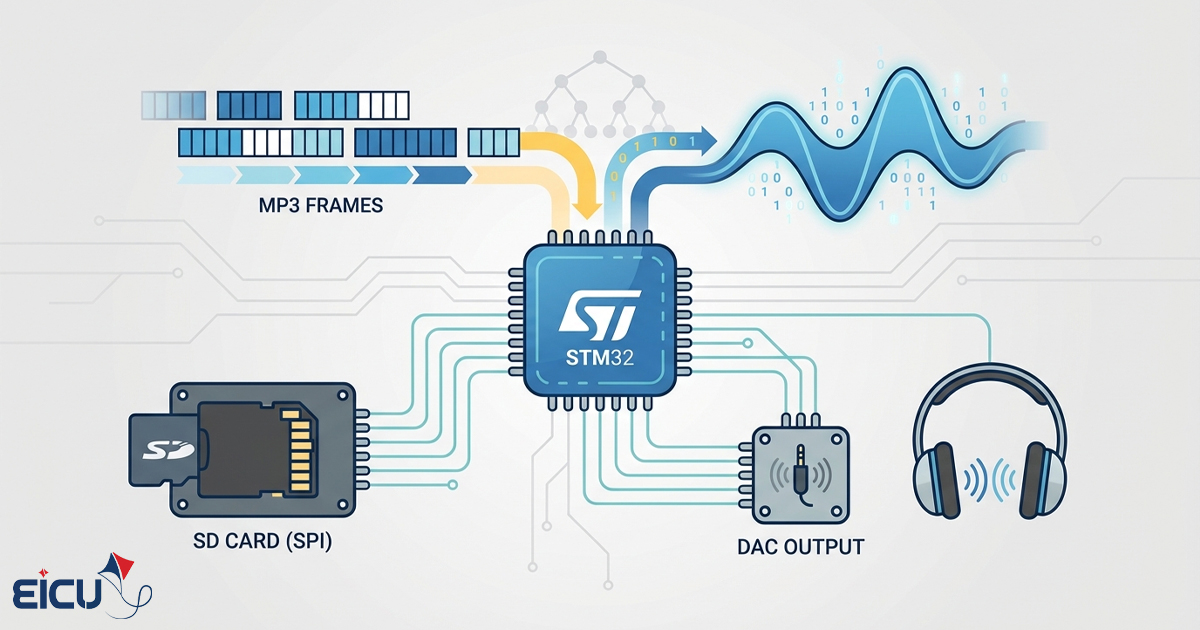
As shown in the image below, the hardware used for MP3 file decoding is a very simple hardware whose main component is an STM32F103RET microcontroller. All processes occur within the microcontroller.
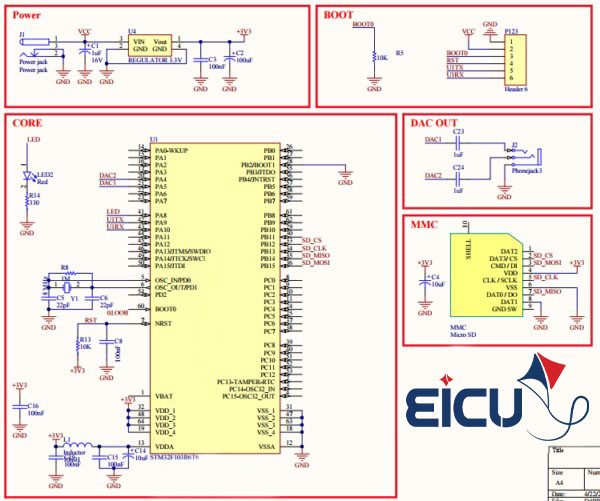
For converting digital data, the internal digital-to-analog converters (DAC) of the microcontroller are used, which can provide a rate of 1 megasample per second and 12-bit precision. The memory card is also connected to the microcontroller using the SPI interface. In fact, the circuit has been designed to be as simple and understandable as possible.
Software
The software is written using the Keil compiler and is capable of playing MP3 files up to 320 kbps and WAV files up to the highest possible bitrate. For faster MP3 decoding, part of the code is written in assembly language. Maximum use has been made of available resources. For transferring audio data to the DAC converters, the DMA unit is used so that the CPU has minimal involvement in this transfer.
|
1 2 3 4 5 6 7 8 9 10 11 12 13 14 15 16 17 18 19 20 21 22 23 24 25 26 27 28 29 30 31 32 |
int main(void){ /* System initialization */ RCC_Configuration(); GPIO_Configuration(); NVIC_Configuration(); buffer_Init(); /* Uart init RX / TX buffers */ USART1_Init(); /* Initialize SD Card with LED feedback */ while(disk_initialize(0)==STA_NOINIT) /* Init SdCard Disk */ { SET_LED(); } RESET_LED(); /* Mount FAT filesystem with LED feedback */ while(f_mount(0,&fs)!=RES_OK) /* Mount Fat File System */ { SET_LED(); } RESET_LED(); printf("Eicut.com\r\n"); MP3_PlayAudioFile("start.mp3"); /* Play Mp3 File */ play_wave("start.wav"); /* Play Wave File */ while(1) { /* Main loop - add your application code here */ } } |
According to the above program, after installing and configuring the memory card, the program first looks for the start.mp3 file within the memory card. If such a file exists, it executes it and after completion, looks for the start.wav file to play it.
You can easily turn this code into a portable MP3 Player by adding the functions and sections you need.
