

Raspberry Pi Guide 2026 – Part 1: Introduction Leave a comment
Table of Content
01 Introduction
02 Raspberry Pi Beyond Linux: Looking at It Through an Embedded Systems Lens
03 What Is Bare-Metal Programming?
04 Raspberry Pi CPU Architectures Explained
05 ARM Architectures Across the Raspberry Pi Family
06 Raspberry Pi Models in 2026: Understanding the Product Family
07 Which Raspberry Pi Should You Choose in 2026?
08 Raspberry Pi Pros and Cons
09 Key Takeaway
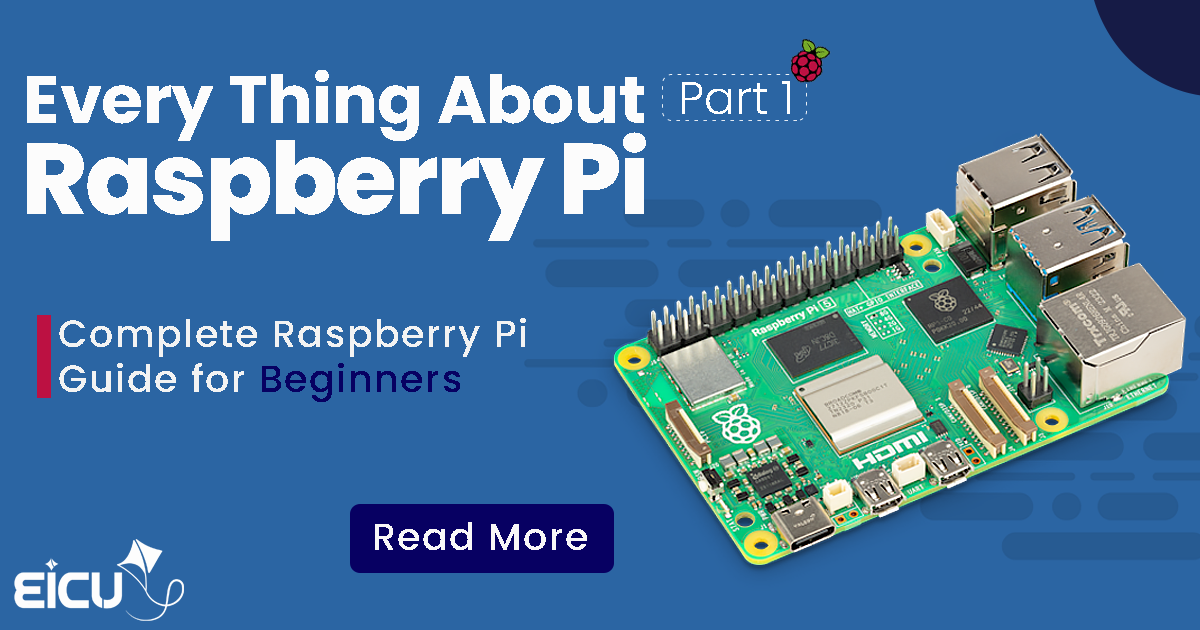
The short answer is simple : Raspberry Pi is a complete computer built on a single circuit board.
Unlike platforms such as Arduino, which are primarily based on microcontrollers, Raspberry Pi includes a high-performance ARM processor, RAM, graphics hardware, high-speed interfaces, storage support, and the ability to run a full operating system.
Depending on the model, a Raspberry Pi can:
Run Linux distributions
Execute Python, C/C++, Rust, Go, or Java applications
Host web servers and databases
Perform image processing and computer vision
Act as an IoT gateway
Run AI and edge-computing workloads
Support networking, automation, and monitoring systems
Modern Raspberry Pi boards can even provide:
Dual 4K display output
PCIe expansion
NVMe SSD support
Faster I/O pipelines
Improved CPU performance for heavier workloads
Key Features:
- Dual 4K display output
- PCIe expansion
- NVMe SSD support
- Faster I/O pipelines
- Improved CPU performance for heavier workloads
However, viewing Raspberry Pi merely as “a small Linux board” misses a large part of the story. Underneath the software layer sits a real ARM processor architecture — one that can be explored deeply from an embedded systems perspective. And that is where Raspberry Pi becomes significantly more interesting.
Raspberry Pi Beyond Linux: Looking at It Through an Embedded Systems Lens
Search for Raspberry Pi tutorials online and you will quickly encounter familiar topics:
- Installing Raspberry Pi OS
- Connecting displays and keyboards
- Controlling LEDs through GPIO
- Writing Python scripts
- Building home automation projects
- Running web servers
These tutorials are useful. But Raspberry Pi offers a much broader engineering landscape. Many users think of Raspberry Pi as: “A compact board designed to run Linux.” From an embedded systems viewpoint, however, the picture changes dramatically.
At the heart of Raspberry Pi lies a multi-core ARM processor — part of the same CPU family used across smartphones, routers, industrial controllers, telecommunications equipment, automotive electronics, and embedded computing platforms.
This raises a more interesting question: What remains if we remove the operating system from the equation?
The answer is A powerful hardware platform containing:
- CPU cores
- RAM
- Timers
- Interrupt controllers
- Peripheral interfaces
- Memory-mapped registers
- Low-level hardware resources
And this is exactly where concepts such as low-level ARM programming, embedded Linux, kernel development, and Bare-Metal programming begin.
What Is Bare-Metal Programming?
One of the most important concepts in embedded software development is Bare-Metal Programming. Bare-Metal development means your software executes directly on hardware — without a conventional operating system sitting between your application and the CPU.
Instead of interacting with high-level abstractions, your code directly manages:
- Memory maps
- Hardware registers
- Timers
- Interrupts
- Peripheral controllers
- CPU execution states
If you have previously worked with STM32, AVR, ESP32, or similar microcontrollers, you have already experienced Bare-Metal concepts. But applying the same approach to a multi-core ARM processor with high clock frequencies, larger memory spaces, caches, MMUs, and advanced execution models creates an entirely different development environment.
Can Raspberry Pi Really Run Without Linux? Yes.
Boot ROM → Bootloader → Hardware Initialization → Bare-Metal Application
Instead of booting Linux first and running your software afterward, your application becomes the primary software layer controlling the machine.
This development model is highly valuable for:
- Embedded high-performance systems
- Custom operating system development
- Hypervisor research
- Low-level ARM experimentation
- Real-time architectures
- Hardware-centric engineering projects
Raspberry Pi is not only a beginner development board. It can also serve as a powerful low-level ARM experimentation platform.
Raspberry Pi CPU Architectures Explained
Once you move beyond simple Linux usage and start exploring embedded development, low-level ARM programming, kernel development, or Bare-Metal systems, understanding Raspberry Pi hardware becomes essential. If your only goal is installing an operating system and running applications, the exact hardware model may not seem very important.
However, in areas such as:
- Bare-Metal Programming
- Embedded Linux Development
- Driver Development
- Kernel Engineering
- ARM Architecture Studies
- Low-Level Hardware Debugging
hardware details become critical. Why? Because important system components can change between Raspberry Pi generations:
- CPU architecture
- Memory organization
- Peripheral controllers
- GPIO implementation
- Interrupt controllers
- Boot behavior
- Memory maps
- Processor execution modes
Understanding these differences helps developers write more portable, optimized, and reliable software.
ARM Architectures Across the Raspberry Pi Family
Throughout its evolution, Raspberry Pi has used multiple generations of ARM processor architectures. Each generation introduced major improvements in computing capability, memory handling, and software flexibility. Understanding these architectural transitions helps explain why software behavior may differ between Raspberry Pi models.
First Generation — ARMv6 Architecture
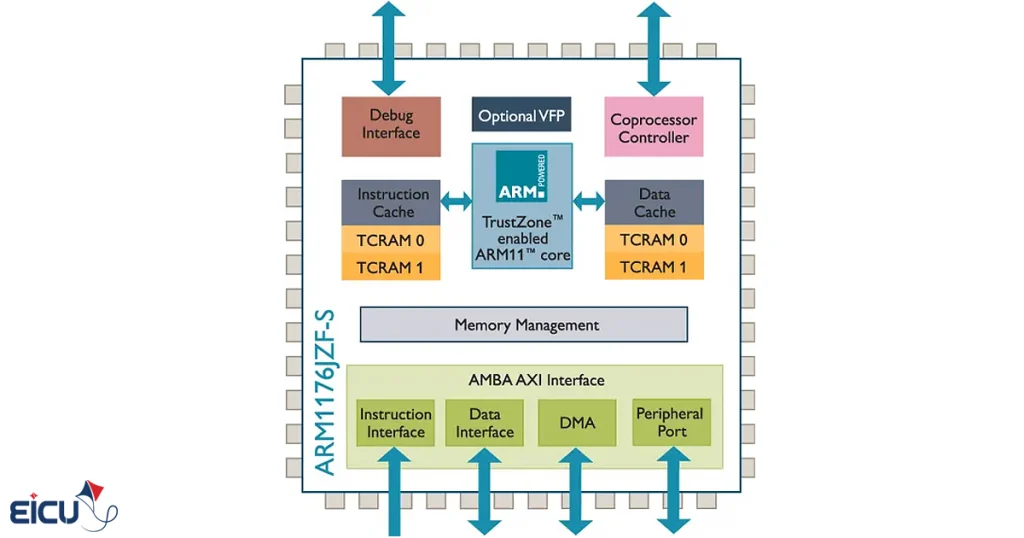
The earliest Raspberry Pi boards were based on the ARMv6 architecture. Representative models include:
- Raspberry Pi Model A
- Raspberry Pi Model B
- Raspberry Pi 1B+
- Raspberry Pi Zero
- Raspberry Pi Zero W
Most of these boards rely on the Broadcom BCM2835 SoC. Their primary CPU core is:
ARM1176JZF-S
Key specifications:
- Single-core processor
- 32-bit architecture
- Approximately 700 MHz clock speed
- Low power consumption
- Suitable for lightweight embedded applications
By modern standards, these boards are no longer high-performance platforms. Nevertheless, they still remain useful for:
- Educational projects
- Low-cost automation
- Lightweight Linux systems
- Simple embedded applications
- Hardware experimentation
From a Bare-Metal learning perspective, ARMv6 platforms can actually be advantageous. Their relative architectural simplicity makes them a practical starting point for developers entering low-level ARM programming.
Second Generation — ARMv7-A and Multi-Core Processing
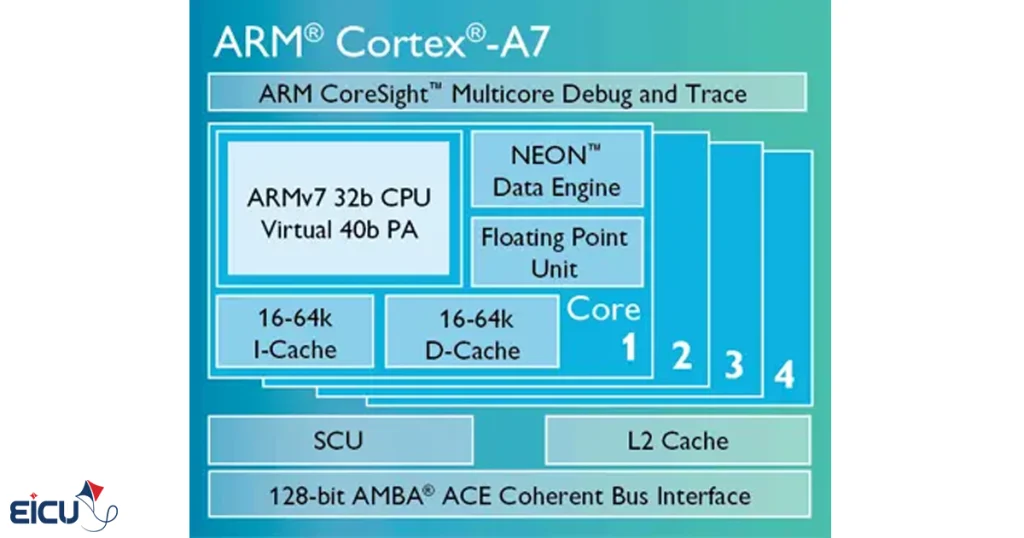
The release of Raspberry Pi 2 Model B marked a major performance leap. This generation transitioned to:
ARMv7-A architecture
The processor core:
Cortex-A7
Key characteristics:
- Quad-core processing
- 32-bit execution model
- Roughly 900 MHz operating frequency
- Improved multi-threading capability
- Significantly higher performance than Pi 1
For many engineers, Raspberry Pi 2 became an accessible introduction to multi-core ARM development. It offered a meaningful jump in processing capability while still remaining relatively approachable from an embedded systems perspective.
ARMv8-A and the Transition to 64-Bit Computing
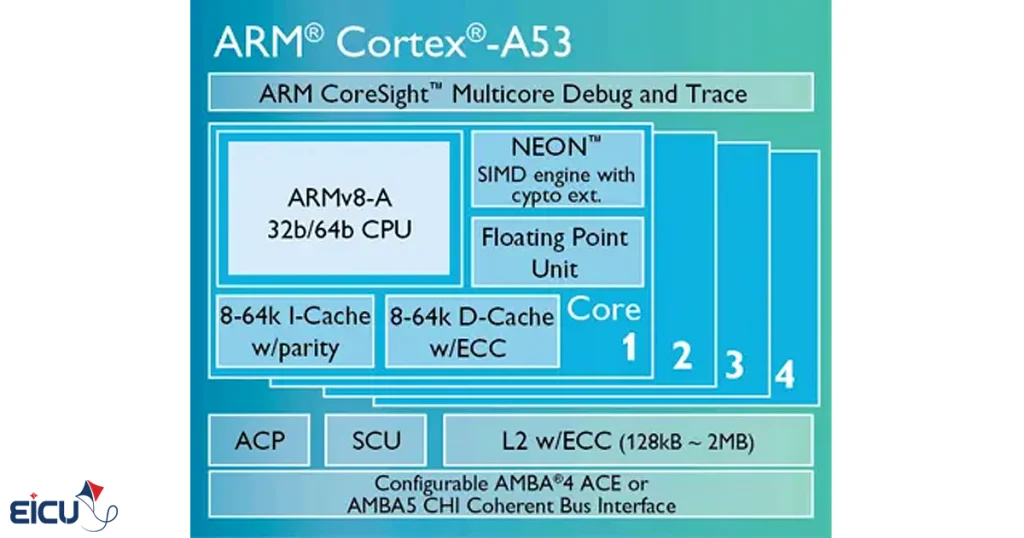
One of the most important milestones in Raspberry Pi history arrived with the adoption of ARMv8-A. This generation introduced 64-bit processing into the Raspberry Pi ecosystem.
Boards commonly associated with this architectural family include:
- Raspberry Pi 3B
- Raspberry Pi 3B+
- Raspberry Pi 4 Model B
- Raspberry Pi 400
- Compute Module 4
These systems typically use processor families such as:
- Cortex-A53
- Cortex-A72
Moving to ARMv8 brought major advantages:
64-bit software support
Larger address spaces
Better computational performance
More advanced CPU features
Improved suitability for modern Linux workloads
But the shift also increases complexity for low-level developers. Topics that become increasingly important include:
- AArch32 vs AArch64
- Exception Levels
- MMU configuration
- Cache management
- Memory translation
- Secure and non-secure execution environments
At this stage, Bare-Metal development becomes significantly more sophisticated than traditional microcontroller programming.
Raspberry Pi 5 and the Cortex-A76 Era
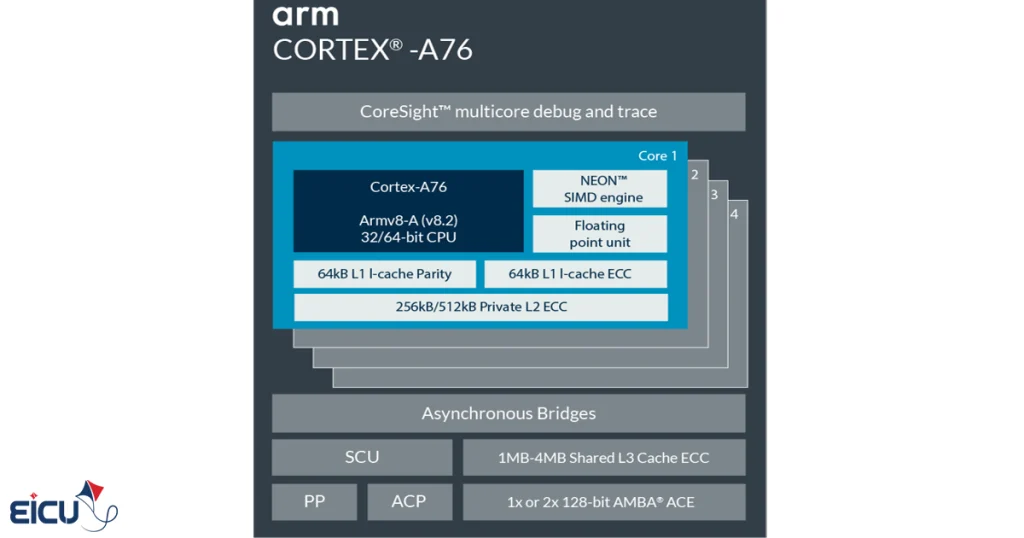
Among current Raspberry Pi platforms, Raspberry Pi 5 represents the flagship mainstream board. It is built around the:
Broadcom BCM2712
and uses:
Quad-Core Cortex-A76 CPU cores
Approximate characteristics include:
- Quad-core design
- 64-bit ARMv8-A architecture
- Around 2.4 GHz operating frequency
- Major CPU performance improvements
- PCIe connectivity
- Faster I/O subsystems
- USB 3 support
- Dual 4K HDMI capability
Compared with earlier generations, Raspberry Pi 5 delivers a substantial leap in raw computational power. This makes it attractive for workloads such as:
- Edge Computing
- Computer Vision
- Lightweight AI inference
- Robotics
- Industrial gateways
- Embedded Linux systems
- High-performance IoT platforms
For professional developers, Pi 5 significantly expands what can realistically be achieved on a compact SBC platform.
Raspberry Pi Models in 2026: Understanding the Product Family
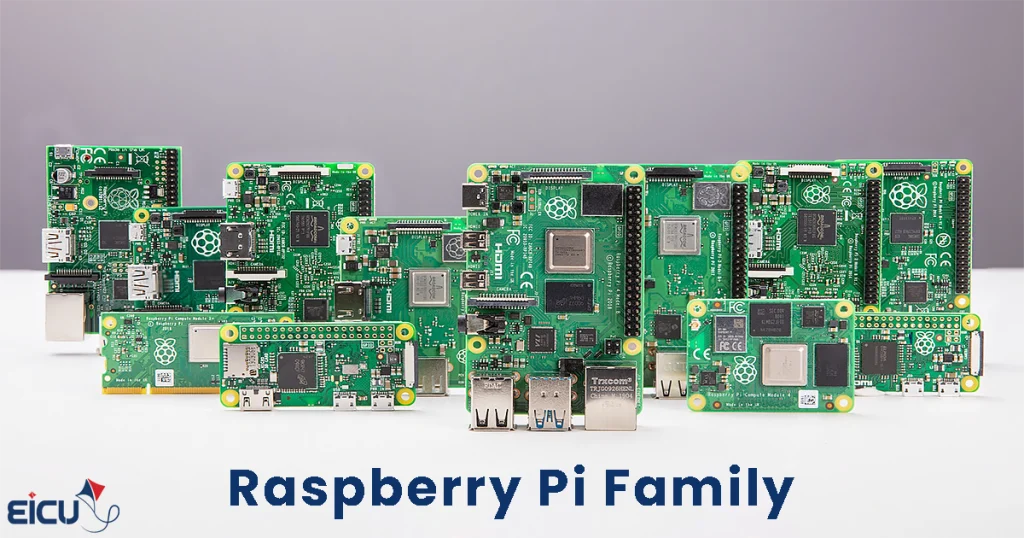
Choosing the correct Raspberry Pi board depends heavily on project requirements. Power consumption, CPU performance, physical size, networking capability, storage requirements, and software architecture all influence platform selection. Let’s examine the major product families.
Raspberry Pi Zero — Small, Minimal, and Cost-Effective
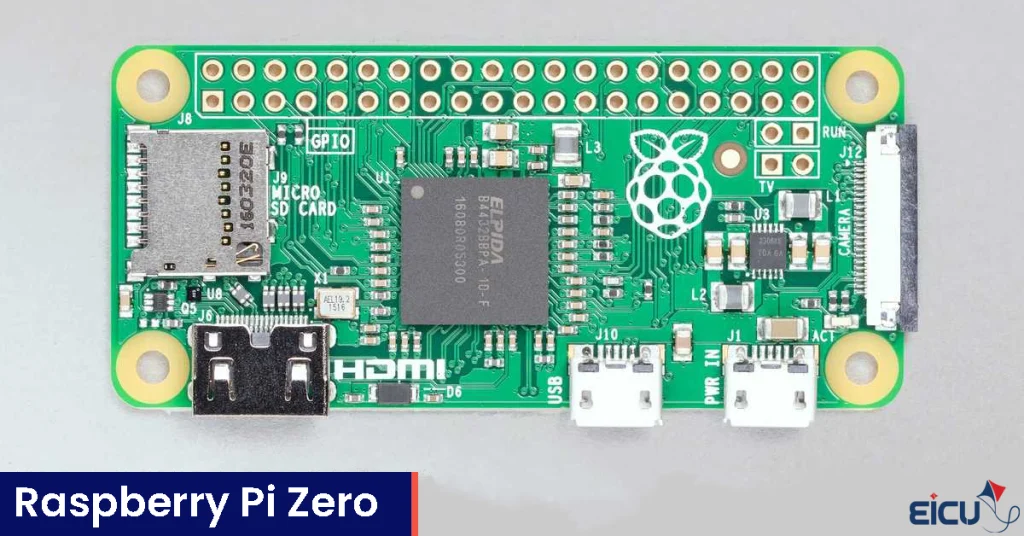
The Zero series was designed for projects where:
- Physical space is limited
- Low power consumption matters
- Budget constraints exist
- Minimal form factor is desirable
Common characteristics include:
Extremely compact dimensions
Low cost
Suitable for lightweight embedded projects
Portable deployment potential
Popular models:
- Raspberry Pi Zero
- Raspberry Pi Zero W
- Raspberry Pi Zero 2 W
These boards are frequently used in:
- Portable IoT devices
- Lightweight automation
- Embedded controllers
- Compact robotics systems
- Sensor gateways
Raspberry Pi Zero 2 W — Small Size, Larger Capability
The Zero 2 W significantly improved the Zero platform. Unlike the original Zero family, this board uses a multi-core CPU design.
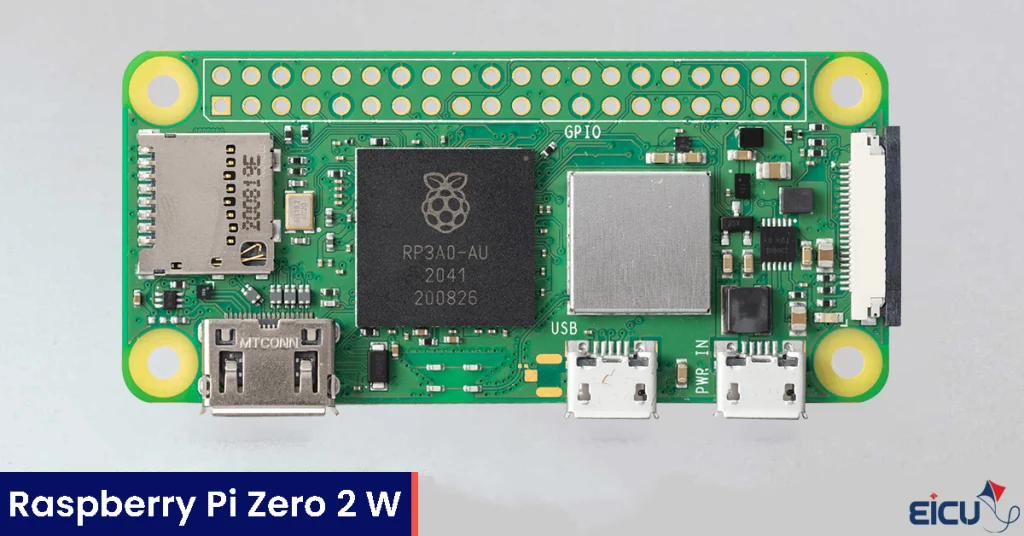
Key specifications:
- Quad-Core Cortex-A53
- Wi-Fi connectivity
- Bluetooth support
- Compact form factor
- Stronger performance than classic Zero models
Common applications include:
- Smart embedded devices
- IoT gateways
- Compact Linux systems
- Robot controllers
- Battery-constrained computing projects
For many developers, Zero 2 W provides one of the best price-to-performance balances in the Raspberry Pi ecosystem.
Raspberry Pi 3 — The Maturing Generation
The Raspberry Pi 3 family represented an important stage in platform maturity.
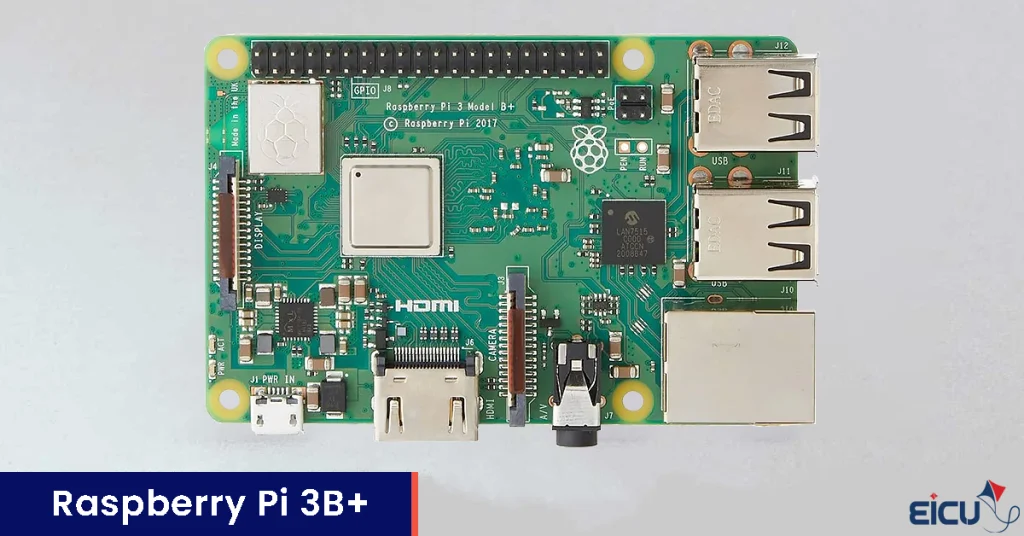
Well-known variants include:
- Raspberry Pi 3B
- Raspberry Pi 3B+
Main features:
- Quad-Core Cortex-A53
- ARMv8-A support
- 64-bit architecture
- Integrated Wi-Fi
- Integrated Bluetooth
- Ethernet networking
Even in 2026, Raspberry Pi 3 boards continue to appear in numerous embedded and IoT deployments. They often remain sufficient for:
- Embedded Linux systems
- Automation platforms
- Educational environments
- Networking experiments
- Moderate embedded workloads
Raspberry Pi 4 Model B — A Major Performance Upgrade
The launch of Raspberry Pi 4 Model B addressed many limitations of earlier generations.
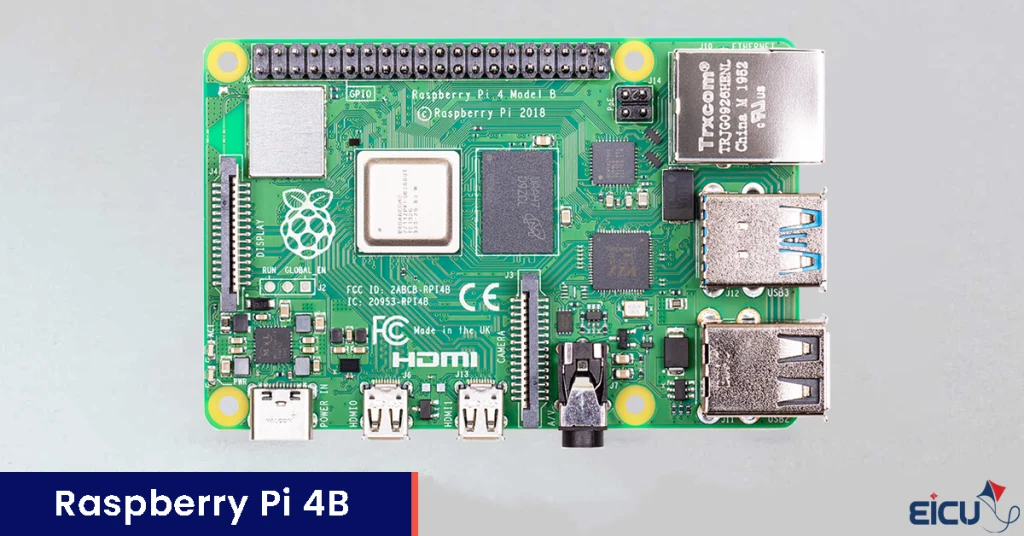
Important capabilities include:
Cortex-A72 CPU
Larger RAM configurations
USB 3 support
Gigabit Ethernet
Dual-display capability
4K video support
Stronger Linux experience
Available RAM variants commonly include:
- 2GB
- 4GB
- 8GB
Pi 4 transformed Raspberry Pi from a lightweight development board into a much more serious miniature computing platform.
Typical use cases:
- Home servers
- NAS systems
- Container workloads
- Network appliances
- IoT gateways
- Embedded dashboards
- Industrial monitoring systems
Raspberry Pi 5 — The Current Mainstream Flagship
If a developer asks for the most powerful general-purpose Raspberry Pi platform available today, the conversation usually points toward Raspberry Pi 5.
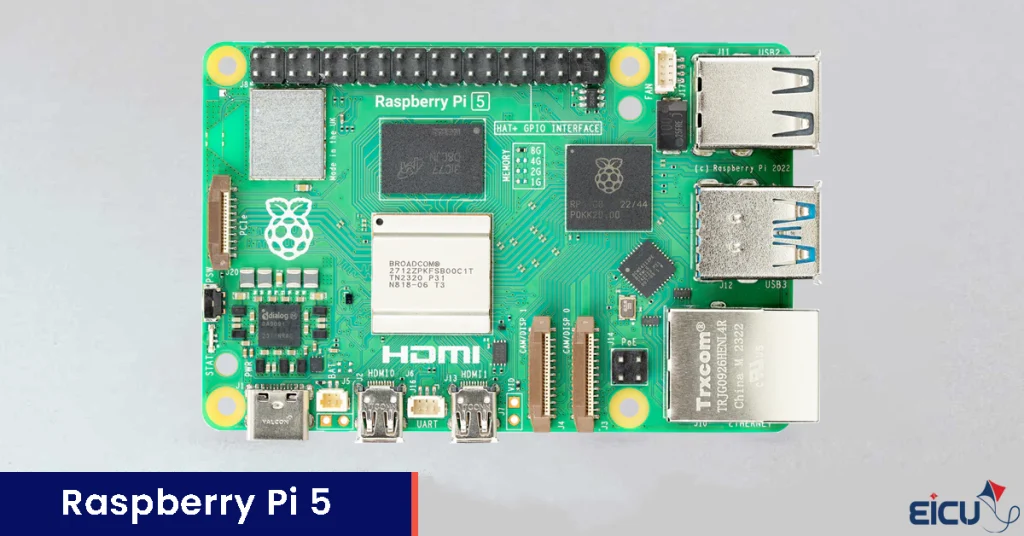
Notable features include:
Cortex-A76 CPU cores
Substantially improved performance
PCIe expansion capability
NVMe SSD compatibility
Faster USB 3 implementation
Improved display subsystem
Faster GPIO and I/O handling
Pi 5 is particularly attractive for:
- AI edge workloads
- Vision systems
- Robotics
- Embedded Linux research
- Industrial gateways
- High-throughput networking
- Advanced maker projects
For developers needing more processing power without leaving the Raspberry Pi ecosystem, Pi 5 is currently one of the strongest choices available.
Compute Module Series — When Raspberry Pi Becomes a Product Platform
Not every engineering project is built around a standard development board. Many commercial and industrial systems require:
- Custom PCB layouts
- Dedicated connectors
- Product-specific power design
- Specialized I/O routing
- Compact mechanical integration
This is exactly where the Compute Module (CM) family becomes important.
Deliver Raspberry Pi computing power in a form factor designed for custom hardware integration.
Instead of using a full-size Raspberry Pi board directly inside a finished product, developers can integrate a Compute Module into their own carrier board.
Popular generations include:
- Compute Module 4 (CM4)
- Compute Module 5 (CM5)
These modules are widely used in:
- Industrial automation systems
- Medical devices
- HMI platforms
- Embedded displays
- Smart kiosks
- Machine vision systems
- Network appliances
- Commercial IoT products
Unlike traditional Raspberry Pi boards, Compute Modules provide far greater hardware flexibility. Depending on the configuration, developers may gain access to:
- Custom storage options
- PCIe connectivity
- Dedicated networking architectures
- Tailored power subsystems
- Custom interface routing
This is one of the reasons Raspberry Pi technology increasingly appears in real commercial products.
Raspberry Pi Pico — Is Pico a Real Raspberry Pi?
This is one of the most common misconceptions in the Raspberry Pi ecosystem. Many users assume that Raspberry Pi Pico is simply a smaller version of a standard Raspberry Pi board. In reality, Pico belongs to a fundamentally different category.
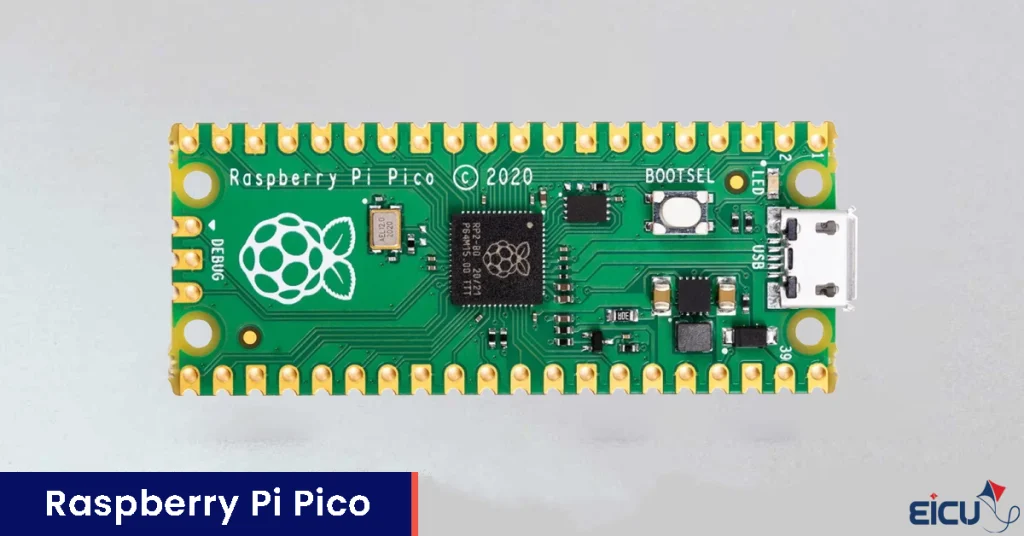
Traditional Raspberry Pi devices are:
Single-Board Computers (SBCs)
Raspberry Pi Pico, however, is a: Microcontroller development platform. That distinction changes almost everything. Instead of using an application processor running Linux, Pico is built around dedicated microcontroller silicon.
Early generations use: RP2040
Newer generations introduce: RP2350
Key Pico characteristics include:
Very low power consumption
Fast boot behavior
Real-time suitability
Direct hardware control
Embedded-focused programming model
No Linux requirement
If your background includes platforms such as:
- STM32
- AVR
- ESP32
- NXP MCU families
Pico will likely feel much more familiar than Raspberry Pi 4 or Raspberry Pi 5. Typical Pico applications include:
- Sensor interfaces
- Real-time control systems
- Robotics controllers
- Motor control
- Embedded instrumentation
- Portable electronics
- Timing-critical applications
In many ways, Pico bridges the gap between the Raspberry Pi ecosystem and the traditional microcontroller world.
Single-Board Computer vs Microcontroller — Understanding the Difference
A common beginner mistake is comparing Raspberry Pi 5 directly against platforms such as STM32 or ESP32 without understanding their architectural differences. While both categories are used in embedded development, they are optimized for different engineering goals.
Single-Board Computers (SBCs)
Examples:
- Raspberry Pi 4
- Raspberry Pi 5
- BeagleBone platforms
- NVIDIA Jetson systems
Typical characteristics:
Powerful multi-core CPUs
Linux support
High memory capacity
Rich networking capabilities
Multimedia support
Complex software ecosystems
Best suited for:
- Edge AI
- Computer vision
- Networking
- Embedded Linux
- Server applications
- Gateway systems
- Multimedia workloads
Microcontrollers (MCUs)
Examples:
- Raspberry Pi Pico
- STM32
- AVR
- ESP32
Typical characteristics:
Deterministic timing
Fast startup
Lower power consumption
Real-time suitability
Direct peripheral access
Simpler runtime environment
Best suited for:
- Industrial control
- Real-time sensing
- Motor control
- Battery-powered devices
- Low-latency automation
- Timing-critical embedded systems
Neither category is universally “better.” The correct choice depends entirely on project requirements.
Which Raspberry Pi Should You Choose in 2026?
Choosing the right Raspberry Pi model is not about buying the most powerful board available. Good engineering decisions come from matching platform capabilities to project needs. The best board for an AI gateway may be completely inappropriate for a battery-powered embedded controller. The table below provides a practical starting point.
Raspberry Pi Selection Guide
| Project Requirement | Recommended Platform |
| Education and lightweight projects | Raspberry Pi Zero / Zero 2 W |
| Lightweight Embedded Linux | Raspberry Pi 3 |
| Networking, servers, moderate computing | Raspberry Pi 4 |
| Heavy processing, AI, robotics | Raspberry Pi 5 |
| Custom industrial hardware | Compute Module 4 / 5 |
| MCU-style embedded development | Raspberry Pi Pico |
Raspberry Pi Pros and Cons
- Supports Linux, RTOS, and Bare-Metal development workflows.
- Powerful ARM processors enable advanced embedded and computing workloads.
- Suitable for IoT, robotics, automation, networking, and edge AI projects.
- Offers deep hardware access for low-level programming and architecture exploration.
- Bare-Metal development introduces higher implementation complexity.
- Linux environments may increase boot time and system overhead.
- Real-time deterministic behavior is not always guaranteed under standard Linux.
- Some industrial or safety-critical systems may require alternative hardware platforms.
Like any engineering platform, Raspberry Pi involves trade-offs. Understanding both strengths and limitations is essential.
Advantages of Raspberry Pi
1. Strong Software Ecosystem
Raspberry Pi benefits from a large software ecosystem. Developers gain access to:
- Linux distributions
- Extensive documentation
- Open-source tooling
- Massive community support
- Mature development workflows
This significantly reduces development friction.
2. Excellent for Learning and Prototyping
Raspberry Pi remains one of the most accessible platforms for:
- Linux learning
- ARM architecture exploration
- Embedded experimentation
- Networking projects
- IoT prototyping
Beginners can start quickly, while professionals can still push the hardware into advanced use cases.
3. Flexible Across Multiple Domains
Few platforms comfortably span so many technical disciplines. Raspberry Pi can be used for:
- Embedded Linux
- Robotics
- AI inference
- Industrial gateways
- Automation
- Digital signage
- Edge computing
- Educational environments
4. Powerful Hardware in a Compact Form
Modern boards such as Raspberry Pi 5 deliver surprisingly strong computational capability relative to their size and cost. For many projects, this balance is extremely attractive.
Disadvantages of Raspberry Pi
1. Limited Deterministic Real-Time Performance
Standard Linux environments are not designed for hard real-time execution. Projects requiring extremely strict timing guarantees may require:
- RTOS approaches
- Dedicated MCUs
- FPGA solutions
- Specialized industrial hardware
2. Increased System Complexity
Linux-based systems introduce additional engineering overhead. Developers may need to manage:
- Kernel behavior
- Package dependencies
- Security updates
- Service orchestration
- Storage integrity
- System maintenance
This complexity should not be underestimated.
3. Power Consumption Considerations
Compared with microcontroller platforms, Raspberry Pi boards generally consume more power. For ultra-low-power battery applications, dedicated MCU platforms often make more sense.
4. Not Ideal for Every Industrial Scenario
Raspberry Pi can absolutely appear in industrial systems. However, extremely demanding environments involving:
- Functional safety
- Life-critical medical systems
- Harsh environmental exposure
- Automotive safety certification
often impose requirements beyond the scope of general-purpose SBC platforms. Engineering context matters.
Key Takeaway
Raspberry Pi is no longer just a beginner development board. In 2026, the ecosystem spans:
- Linux computing
- Embedded systems
- Bare-Metal experimentation
- Industrial product development
- IoT platforms
- Edge AI workloads
- Real-time microcontroller development through Pico
Understanding the differences between architectures, product families, and software approaches is the key to choosing the correct platform. The most important question is not:
“Which Raspberry Pi is the best?” The real engineering question is:
Which Raspberry Pi is best for your specific workload, constraints, and system architecture?
