

Complete 4-Channel Remote Control Project – Free with Documentation Leave a comment
4-Channel Remote Control Project
- The project uses the ATmega328P microcontroller (the same one found on most Arduino boards).
- With minimal changes, the code can be easily ported to other AVR microcontrollers, including the ATmega8.
- We chose the ATmega328P specifically because it is already present on Arduino boards, so anyone can prototype the circuit extremely quickly using an Arduino.
In the tested prototype, an Arduino Nano running at 16 MHz was used — this is the default frequency of most Arduino boards. However, simply changing the clock frequency setting in the compiler allows the code to be compiled and run on other microcontrollers as well.
Updates to the Code-Learning Remote Library
The original code-learning remote library was written in 2009 and had never been updated or corrected since then. For this reason, several parts of the library have been completely rewritten to make the code more robust, cleaner, and truly portable.
The most important change is in the decoding routine. In the old version, the maximum and minimum allowed pulse lengths were hard-coded in microseconds. This caused serious problems whenever the timer clock frequency was changed — the code simply stopped working correctly if the MCU ran at anything other than the originally assumed frequency.
In the new version, all timing limits are now automatically calculated based on the actual microcontroller clock frequency, making the library fully independent of the clock speed and easily portable across different AVRs and frequencies.
|
1 2 |
#define Min_Pulse_Len 200 /* In us */ #define Max_Pulse_Len 15000 /* In us*/ |
Those hard-coded absolute values have been completely removed from the program, so changing the timer/clock frequency will no longer cause any problems in execution or decoding.
In the new version, pulse identification is now based solely on the ratio between high and low periods. Thanks to this method, you can now freely change the timer frequency without any worries.
|
1 2 3 |
#define IS_Sync_Start_Pulse(T1,T2) (T2 > (T1*29) && T2 < (T1*32)) #define Bit_IS_Zero(T1,T2) (T2 > (T1*2) && T2 < (T1*4)) #define Bit_IS_One(T1,T2) (T1 > (T2*2) && T1 < (T2*4)) |
The library has been successfully tested with timer counting frequencies of 1 MHz and 2 MHz — in both cases it worked perfectly with no issues.
Another important change concerns the way received bits from the remote are stored. In the old library, a full array of 24 bytes was used (one byte per bit), which unnecessarily wasted 24 bytes of precious SRAM.
In the new version, the 24 received bits are now packed into a single 32-bit variable (just 4 bytes).
|
1 2 3 4 5 6 7 8 9 10 11 12 13 14 15 16 17 |
uint8_t Remode_Data[24]; if(Start_Sync==1) // Start Sended { if(Bit_Index < 24) { Remode_Data[Bit_Index] = !Bit_IS_Zero(Time_Rising,Time_Falling); Bit_Index++; } else { // All Bit Recive Bit_Index = 0; Start_Sync = 0; Revice_Flag = 1; } } // End of Start Sync Send |
In the rewritten library, each bit now truly occupies only one single bit of memory. All received data is packed into a 32-bit long variable, using just 4 bytes of RAM in total.
To keep decoding as fast as possible, a lookup table has been added (it takes 128 bytes of Flash memory). Given that the ATmega328P has 32 KB of Flash, 128 bytes is really negligible.
Click here to read the article ‘ Remote Hopping ‘
|
1 2 3 4 5 6 7 8 9 10 11 12 13 14 15 16 17 18 19 20 21 22 23 24 25 26 27 28 29 30 31 32 33 34 35 36 37 38 39 40 41 42 |
volatile uint32_t EV_Code = 0; const uint32_t Bit_Shift[32] PROGMEM = { 0x00000001,0x00000002,0x00000004,0x00000008, 0x00000010,0x00000020,0x00000040,0x00000080, 0x00000100,0x00000200,0x00000400,0x00000800, 0x00001000,0x00002000,0x00004000,0x00008000, 0x00010000,0x00020000,0x00040000,0x00080000, 0x00100000,0x00200000,0x00400000,0x00800000, 0x01000000,0x02000000,0x04000000,0x08000000, 0x10000000,0x20000000,0x40000000,0x80000000, }; . . . . if(Start_Sync==1) // Start Sended { if(Bit_Index < 23) { if(Bit_IS_Zero(Time_Rising,Time_Falling)) { Bit_Index++; } else if(Bit_IS_One(Time_Rising,Time_Falling)) { Receive_Code |= pgm_read_dword(&Bit_Shift[(23-Bit_Index)]); Bit_Index++; } else { Start_Sync = 0; Bit_Index = 0; } } . . . |
Hardware
|
1 2 3 4 5 6 7 8 9 10 11 12 13 14 15 16 17 18 19 20 21 22 |
#define Key_Pin 3 #define Key_PORT PORTD #define Key_DDR DDRD #define Key_PIN PIND #define LED_Pin 4 #define LED_PORT PORTC #define LED_DDR DDRC #define CH0_Pin 0 #define CH1_Pin 1 #define CH2_Pin 2 #define CH3_Pin 3 #define CH_PORT PORTC #define CH_DDR DDRC /* Pin mappings: RF_IN -> PORTD.2 Key -> PORTD.3 LED -> PORTC.4 CH0 ~ CH3 -> PORTC.0 ~ PORTC.3 */ |
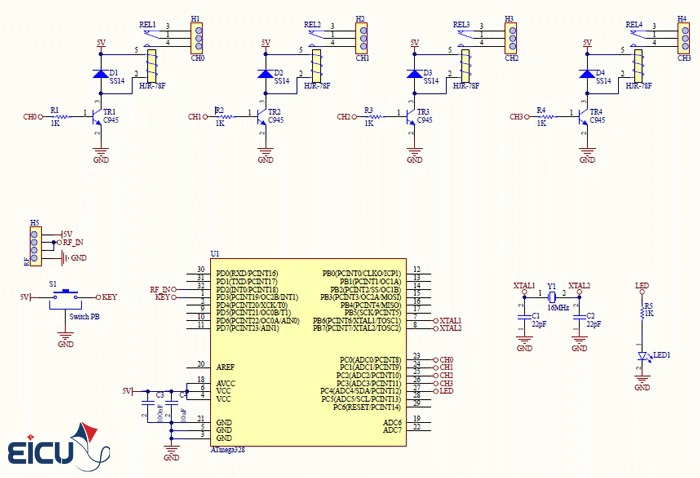
You can download the 4-channel remote control schematic from the link below: Remote 4 channel schematic
For assembly and understanding the connections, please refer to the diagram above. All pins except RF_IN are fully configurable in the code.
In the program, Timer1 is used as the counter. Note: Because we need high precision when measuring pulse lengths, a 16-bit timer is required. If you plan to change the timer, make sure to select another 16-bit timer (such as Timer3 or Timer5 on larger AVRs).
How the 4-Channel Remote Program Works
The program operates in three distinct modes:
|
1 2 3 4 5 6 |
enum { Nurmal = 0, Learn, Erase, }; |
- Normal Mode
- Learn Mode
- Clear Memory Mode
Normal Mode
After powering on, the device starts in Normal Mode. In this mode, the on-board LED blinks once per second (1 second on, 1 second off). When any button on a previously learned remote is pressed, the corresponding output relay toggles its state.
Learn Mode
To register (teach) a new remote to the receiver, the device must be put into Learn Mode. To enter Learn Mode: press and hold the on-board button for 1.5 seconds, then release it. The LED will start blinking rapidly. Now press any button on the remote you want to register — the device will store its unique code. After successful learning, the device automatically returns to Normal Mode.
Click here to read the article ‘ Everything About Software MP3 Decoding Using a Microcontroller ‘
Clear Memory Mode
To erase all stored remotes from memory: press and hold the on-board button for 10 seconds, then release. The LED will stay on continuously for 3 seconds and then turn off. After this, all previously learned remotes are completely cleared from memory.
Download the 4-Channel Remote Control Project Source Code
For easier access, future updates, bug fixes, and version history tracking, the complete source code has been uploaded to GitHub and is now publicly available.
- To view the repository, go to this address
- To download the compiled hex file and full source code, go to this address
